# System Information

## Chapter 7.2: Viewing System Information

A detailed, read-only manifest of your node's hardware components and their specifications.

> ℹ️ System Information Access
>
> * Available to: All user roles
> * Scope: Individual node level
> * Permissions: Read-only for all users
> * Data Source: Retrieved directly from node's BMC via Redfish protocol

## Overview: Your Digital Asset Tag

The **`System Information`** **tab** is your node's digital asset tag. It provides a complete and detailed inventory of every physical hardware component installed in the machine, from the exact model of the CPU to the part number of each individual memory module.

This information is fetched directly from the node's BMC, ensuring it's an accurate reflection of the physical hardware. This page is read-only and serves three primary real-world purposes:

* **Asset Management:** Quickly audit hardware without needing physical access.
* **Technical Support:** Provide precise component details to support teams.
* **Upgrade & Compatibility Planning:** Verify current specs before ordering new parts.

{% hint style="info" %}
**Data Accuracy:** All information is retrieved in real-time from the BMC, ensuring you see the actual installed hardware configuration, not cached or manually entered data.
{% endhint %}

## Hardware Component Deep Dive

The page organizes the hardware into logical, collapsible categories. Click on any category header (e.g., BIOS, BMC, CHASSIS) to expand it and view detailed specifications.

🖼️ \*\*

<figure><img src="https://1276453224-files.gitbook.io/~/files/v0/b/gitbook-x-prod.appspot.com/o/spaces%2FKIntRklqUYVFaVsqd0g7%2Fuploads%2FWp5n0fqUzptkfFE1ilph%2Fimage.png?alt=media&#x26;token=9c235321-f1f7-4177-aa75-e7a32acd7167" alt=""><figcaption></figcaption></figure>

### Navigation Tips

* **Expandable Sections:** Click category headers to expand/collapse detailed views.
* **Complete Inventory**: All sections provide comprehensive component-level details.
* **Copy-Friendly Format:** Information is formatted for easy copying to support tickets.

### Core Firmware & Identity

These sections provide version and identity information for the node's core firmware and management controller.

#### **BIOS**&#x20;

<table><thead><tr><th width="140.109375">Field</th><th>Description &#x26; Why It Matters</th><th>Use Cases</th></tr></thead><tbody><tr><td>Manufacturer</td><td>The vendor of the BIOS firmware (e.g., Senao Networks, Inc.).</td><td>Identifying the source of firmware updates.</td></tr><tr><td>Firmware Version</td><td>The version of the system's BIOS/UEFI (e.g., 0x6). Critical for checking compatibility with new OS versions or hardware.</td><td>OS compatibility verification, security updates, feature availability.</td></tr></tbody></table>

#### **BMC (Baseboard Management Controller)**

<table><thead><tr><th width="137.921875">Field</th><th width="301.47265625">Description &#x26; Why It Matters</th><th>Use Cases</th></tr></thead><tbody><tr><td>IPv4 Address</td><td>The primary management IP address assigned to the BMC.</td><td>Network connectivity, accessing BMC web UI.</td></tr><tr><td>IPv6 Address</td><td>The IPv6 management address assigned to the BMC, if configured.</td><td>Network connectivity in IPv6 environments.</td></tr><tr><td>Firmware Version</td><td>The version of the BMC's firmware (e.g., 02.06.01). Essential for security audits and ensuring you have the latest management features.</td><td>Security compliance, management feature availability, Redfish compatibility.</td></tr><tr><td>MAC Address</td><td>The unique hardware address of the BMC's network interface (e.g., 34:76:C5:E7:40:06). Needed for network troubleshooting and configuring DHCP reservations.</td><td>Network configuration, DHCP reservations, MAC-based security.</td></tr><tr><td>Subnet Mask</td><td>The subnet mask associated with the BMC's IPv4 address.</td><td>Verifying network configuration.</td></tr><tr><td>Gateway</td><td>The default gateway IP address used by the BMC.</td><td>Verifying network configuration for remote access.</td></tr><tr><td>Redfish</td><td>The version of the Redfish schema supported by the BMC (e.g., 1.6.0). Indicates API capabilities.</td><td>Automation scripting, integration with other management tools.</td></tr><tr><td>Serial Number</td><td>The serial number associated with the BMC module itself (may differ from Chassis SN).</td><td>BMC-specific support or replacement.</td></tr><tr><td>Part Number</td><td>The manufacturer's part number for the BMC module.</td><td>BMC-specific support or replacement.</td></tr></tbody></table>

### Physical Chassis & Mainboard

These sections detail the physical enclosure and main circuit board of the node, providing the primary identifiers for the machine as a whole.

<figure><img src="https://1276453224-files.gitbook.io/~/files/v0/b/gitbook-x-prod.appspot.com/o/spaces%2FKIntRklqUYVFaVsqd0g7%2Fuploads%2Far7elDQ103HKCOIEw4KS%2Fimage.png?alt=media&#x26;token=7cafee9f-f633-418a-b132-e60f6b43c42e" alt=""><figcaption></figcaption></figure>

#### **CHASSIS**

<table><thead><tr><th width="143.23046875">Field</th><th>Description &#x26; Why It Matters</th><th>Primary Use</th></tr></thead><tbody><tr><td>Model Name</td><td>The model name of the node's chassis (e.g., SR710).</td><td>Hardware compatibility and specification verification.</td></tr><tr><td>Manufacturer</td><td>The manufacturer of the chassis (e.g., Senao Networks, Inc.).</td><td>Identifying the hardware vendor.</td></tr><tr><td>Type</td><td>The physical form factor of the chassis (e.g., Rackmount Server).</td><td>Data center planning, rack compatibility.</td></tr><tr><td>Serial Number</td><td>The unique serial number of the chassis. This is often the primary serial number you need for asset tagging and support contracts.</td><td>Primary Asset ID - Use for support tickets and inventory.</td></tr><tr><td>Part Number</td><td>The manufacturer's part number for the chassis assembly.</td><td>Ordering replacement chassis parts.</td></tr></tbody></table>

{% hint style="success" %}
**Asset Management Tip:** The Chassis Serial Number should be your primary identifier in all asset management systems, support tickets, and inventory records.
{% endhint %}

#### **BASEBOARD**

<figure><img src="https://1276453224-files.gitbook.io/~/files/v0/b/gitbook-x-prod.appspot.com/o/spaces%2FKIntRklqUYVFaVsqd0g7%2Fuploads%2FuUPm9SfdfXehxTduKO6X%2Fimage.png?alt=media&#x26;token=82a03329-a3cd-419f-a6d2-88c32107076c" alt=""><figcaption></figcaption></figure>

<table><thead><tr><th width="149.42578125">Field</th><th>Description &#x26; Why It Matters</th><th>Primary Use</th></tr></thead><tbody><tr><td>Product</td><td>The product name of the motherboard (e.g., BNC_Baseboard).</td><td>Identifying the motherboard model.</td></tr><tr><td>Manufacturer</td><td>The manufacturer of the motherboard (e.g., Senao Networks, Inc.).</td><td>Identifying the hardware vendor.</td></tr><tr><td>Serial Number</td><td>The unique serial number of the motherboard.</td><td>Motherboard-specific support or warranty claims.</td></tr><tr><td>Part Number</td><td>The manufacturer's part number for the motherboard. Useful for identifying specific board revisions.</td><td>Motherboard compatibility and replacement part ordering.</td></tr></tbody></table>

### Compute & Memory Resources

Here you can find a detailed breakdown of the node's core computing and memory resources.

#### **COMPUTER SYSTEM**

<div align="left"><figure><img src="https://1276453224-files.gitbook.io/~/files/v0/b/gitbook-x-prod.appspot.com/o/spaces%2FKIntRklqUYVFaVsqd0g7%2Fuploads%2FdS1pYQnRJugnGVtwQHRQ%2Fimage.png?alt=media&#x26;token=a779fde7-e916-4571-92b1-e948319bf37a" alt=""><figcaption></figcaption></figure></div>

<table><thead><tr><th width="143.7265625">Field</th><th width="316.75390625">Description &#x26; Why It Matters</th><th>Primary Use</th></tr></thead><tbody><tr><td>Manufacturer</td><td>The manufacturer of the overall system (e.g., Senao Networks, Inc.).</td><td>Identifying the system integrator/vendor.</td></tr><tr><td>Visible Physical Memory</td><td>The total amount of installed RAM detected by the system (e.g., 128 GB). A key specification for performance and capacity planning.</td><td>Performance tuning, capacity planning, OS requirements check.</td></tr><tr><td>Number of Processors</td><td>The count of physical CPU sockets populated on the motherboard (e.g., 2).</td><td>Verifying CPU configuration, licensing calculations.</td></tr><tr><td>Number of Memories</td><td>The count of installed physical memory modules (DIMMs).</td><td>Verifying memory configuration, troubleshooting.</td></tr><tr><td>Number of Hard Disks</td><td>The count of detected storage drives (HDDs/SSDs).</td><td>Verifying storage configuration.</td></tr><tr><td>Number of Power Supplies</td><td>The count of installed Power Supply Units (PSUs).</td><td>Verifying power redundancy configuration.</td></tr></tbody></table>

#### **PROCESSOR**

This lists each physical Central Processing Unit (CPU) installed in the node.

<div align="left"><figure><img src="https://1276453224-files.gitbook.io/~/files/v0/b/gitbook-x-prod.appspot.com/o/spaces%2FKIntRklqUYVFaVsqd0g7%2Fuploads%2FHXRE7myDh2K70dRrpuIw%2Fimage.png?alt=media&#x26;token=843d907b-79b3-4d65-839e-6f722462e61d" alt=""><figcaption></figcaption></figure></div>

<table><thead><tr><th width="137.640625">Field</th><th width="355.71484375">Description &#x26; Why It Matters</th><th>Planning Use</th></tr></thead><tbody><tr><td>Name</td><td>An identifier for the CPU socket (e.g., Processor_0).</td><td>Locating the specific CPU.</td></tr><tr><td>Manufacturer</td><td>The vendor of the CPU (e.g., Intel(R) Corporation).</td><td>Identifying the CPU manufacturer.</td></tr><tr><td>Location</td><td>The physical socket identifier on the motherboard (e.g., CPU0).</td><td>Physical identification for replacement/upgrade.</td></tr><tr><td>Model</td><td>The specific model name of the CPU (e.g., GENUINE INTEL(R) XEON(R)). Determines its performance capabilities.</td><td>Performance planning, software licensing, compatibility checks.</td></tr><tr><td>Serial Number</td><td>The serial number of the specific CPU chip (if available).</td><td>CPU-specific tracking or warranty.</td></tr><tr><td>Part Number</td><td>The manufacturer's part number for the CPU.</td><td>Ordering exact replacement CPUs.</td></tr><tr><td>Max Speed MHz</td><td>The maximum rated clock speed of the CPU.</td><td>Performance benchmarking.</td></tr><tr><td>Operating Speed MHz</td><td>The current or base operating speed of the CPU.</td><td>Performance verification.</td></tr><tr><td>Processor Architecture</td><td>The instruction set architecture (e.g., x86).</td><td>OS and software compatibility.</td></tr><tr><td>Core Count</td><td>The number of physical cores on the CPU chip (e.g., 64). Key metric for performance and licensing.</td><td>Workload capacity planning, per-core licensing.</td></tr><tr><td>Core Enabled</td><td>The number of cores currently enabled.</td><td>Verifying CPU configuration.</td></tr><tr><td>Thread Count</td><td>The number of logical threads the CPU supports (e.g., 128, often 2x Core Count with hyper-threading). Key metric for parallel processing performance.</td><td>Workload capacity planning, performance tuning.</td></tr></tbody></table>

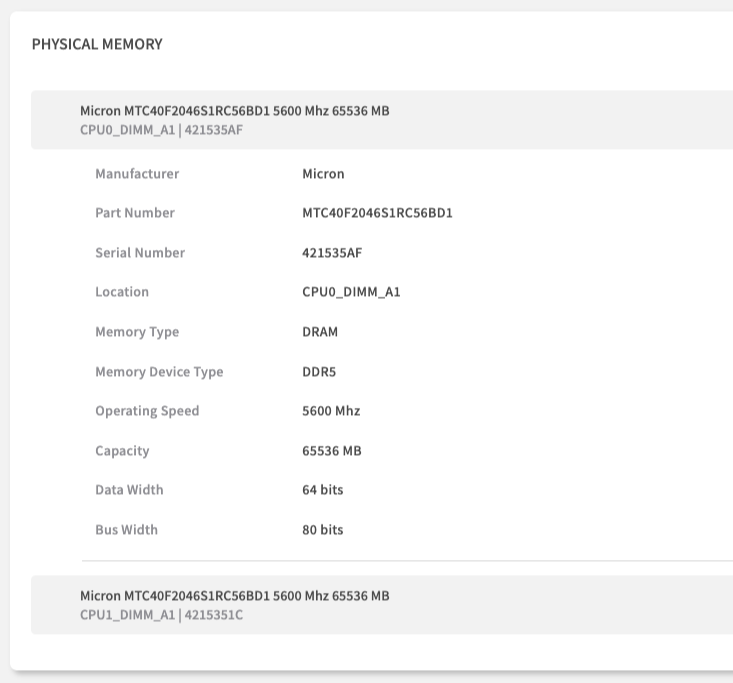
#### **PHYSICAL MEMORY**

This section lists each individual memory module (DIMM) installed in the node, which is invaluable for troubleshooting and planning upgrades.

<div align="left"><figure><img src="https://1276453224-files.gitbook.io/~/files/v0/b/gitbook-x-prod.appspot.com/o/spaces%2FKIntRklqUYVFaVsqd0g7%2Fuploads%2FrEcfx1sQ4vNdd6lUesHN%2Fimage.png?alt=media&#x26;token=256ce0dc-21fa-47a9-b452-d0ba35ad6f41" alt=""><figcaption></figcaption></figure></div>

<table><thead><tr><th width="159.25390625">Field</th><th width="330.94921875">Description &#x26; Why It Matters</th><th>Critical For</th></tr></thead><tbody><tr><td><p>Header </p><p>(e.g., Micron...)</p></td><td>A summary line often including Manufacturer, Part Number, Speed, Size, Location, and Serial Number.</td><td>Quick identification.</td></tr><tr><td>Manufacturer</td><td>The vendor of the DIMM (e.g., Micron).</td><td>Verifying memory vendor.</td></tr><tr><td>Part Number</td><td>The specific part number of the memory module. Use this to ensure you order an identical, compatible replacement or upgrade.</td><td>Procurement - Compatible part ordering.</td></tr><tr><td>Serial Number</td><td>The unique serial number of the individual DIMM.</td><td>Warranty claims, tracking specific modules.</td></tr><tr><td>Location</td><td>The physical slot on the motherboard where the DIMM is installed (e.g., CPU0_DIMM_A1). Crucial for telling a technician exactly which DIMM to replace.</td><td>Field Service - Exact replacement location.</td></tr><tr><td>Memory Type</td><td>The general type of memory (e.g., DRAM).</td><td>Basic classification.</td></tr><tr><td>Memory Device Type</td><td>The specific memory technology standard (e.g., DDR5).</td><td>Compatibility checks.</td></tr><tr><td>Operating Speed</td><td>The speed at which the memory is currently operating (e.g., 5600 Mhz). May differ from max speed due to system configuration.</td><td>Performance verification, compatibility checks.</td></tr><tr><td>Capacity</td><td>The storage capacity of the individual DIMM (e.g., 65536 MB = 64 GB).</td><td>Capacity Planning - Memory configuration analysis.</td></tr><tr><td>Data Width</td><td>The width of the data bus for the module (e.g., 64 bits). Standard for most DIMMs.</td><td>Technical specification.</td></tr><tr><td>Bus Width</td><td>The total bus width including ECC bits (e.g., 80 bits for ECC DDR5). Indicates ECC capability.</td><td>Verifying ECC support.</td></tr></tbody></table>

### Power & Storage

This section details the power supply and storage components installed in the node.

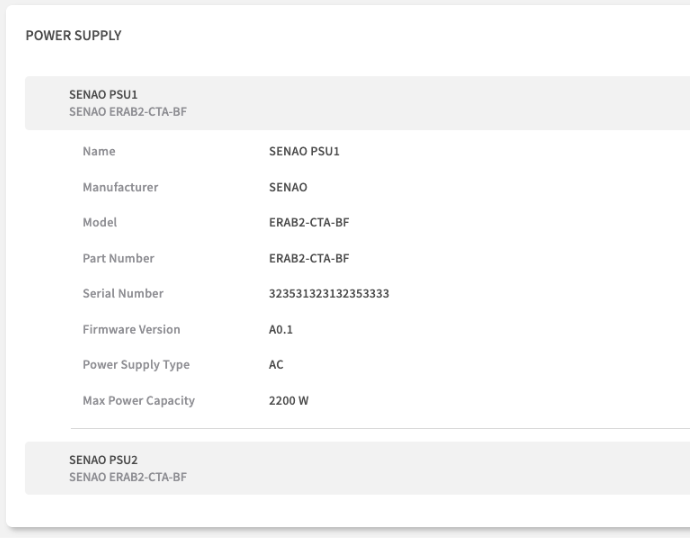
#### **POWER SUPPLY**

This lists each installed Power Supply Unit (PSU).

<div align="left"><figure><img src="https://1276453224-files.gitbook.io/~/files/v0/b/gitbook-x-prod.appspot.com/o/spaces%2FKIntRklqUYVFaVsqd0g7%2Fuploads%2Ftrf5W4c5SVHCEZJ8hP3Y%2Fimage.png?alt=media&#x26;token=981d9c76-b7aa-4f69-9e98-036879433ca8" alt=""><figcaption></figcaption></figure></div>

<table><thead><tr><th width="185.671875">Field</th><th width="306">Description &#x26; Why It Matters</th><th>Critical For</th></tr></thead><tbody><tr><td><p>Header </p><p>(e.g., SENAO PSU1...)</p></td><td>A summary line often including Name, Model.</td><td>Quick identification.</td></tr><tr><td>Name</td><td>The identifier for the PSU slot (e.g., SENAO PSU1).</td><td>Locating the specific PSU.</td></tr><tr><td>Manufacturer</td><td>The vendor of the PSU (e.g., SENAO).</td><td>Identifying the PSU vendor.</td></tr><tr><td>Model</td><td>The specific model number of the PSU.</td><td>Replacement part ordering.</td></tr><tr><td>Part Number</td><td>The manufacturer's part number for the PSU.</td><td>Replacement part ordering.</td></tr><tr><td>Serial Number</td><td>The unique serial number of the PSU. Often required when requesting a warranty replacement for a failed unit.</td><td>Warranty Claims - PSU replacement.</td></tr><tr><td>Firmware Version</td><td>The firmware version running on the PSU's internal controller (if applicable).</td><td>PSU feature updates or bug fixes.</td></tr><tr><td>Power Supply Type</td><td>The type of input power (e.g., AC).</td><td>Data center power compatibility.</td></tr><tr><td>Max Power Capacity</td><td>The maximum power output of the PSU in watts (e.g., 2200 W). Important for data center power planning.</td><td>Power Planning - Data center capacity, redundancy calculations.</td></tr></tbody></table>

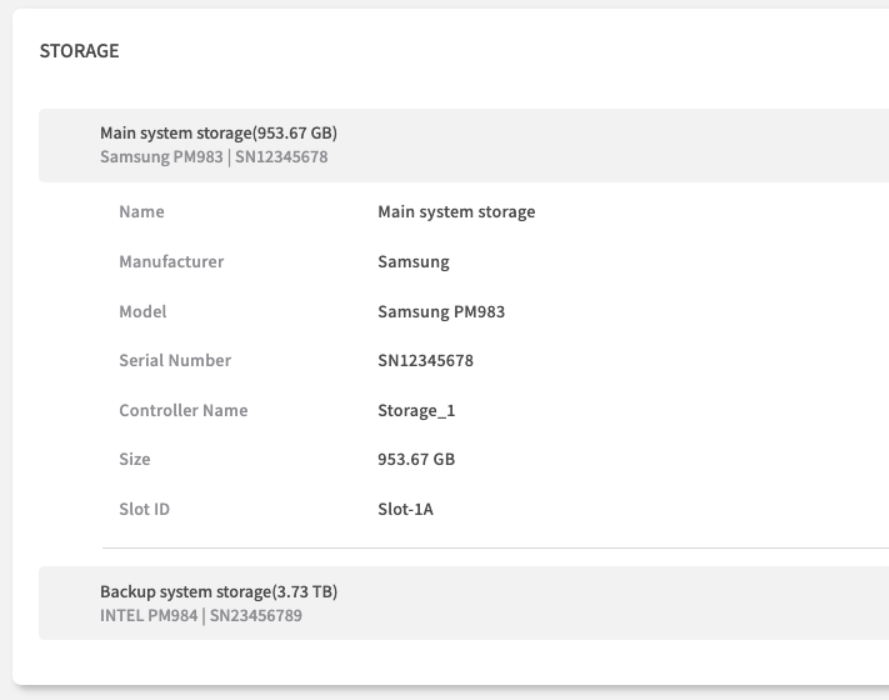
#### **STORAGE**

This lists each installed storage drive (HDD/SSD).

<figure><img src="https://1276453224-files.gitbook.io/~/files/v0/b/gitbook-x-prod.appspot.com/o/spaces%2FKIntRklqUYVFaVsqd0g7%2Fuploads%2FuedAYOxJhcgJS8yTp1F0%2Fimage.png?alt=media&#x26;token=b5c8496e-ec90-44cc-885e-960d1a19b58e" alt=""><figcaption></figcaption></figure>

<table><thead><tr><th width="176.58203125">Field</th><th width="336.81640625">Description &#x26; Why It Matters</th><th>Essential For</th></tr></thead><tbody><tr><td><p>Header </p><p>(e.g., Main system storage...)</p></td><td>A summary line often including Name, Size, Model, Serial Number.</td><td>Quick identification.</td></tr><tr><td>Name</td><td>A descriptive name for the storage device or volume (e.g., Main system storage).</td><td>Identifying the drive's purpose.</td></tr><tr><td>Manufacturer</td><td>The vendor of the drive (e.g., Samsung, INTEL).</td><td>Looking up drive specifications or firmware.</td></tr><tr><td>Model</td><td>The specific model number of the drive (e.g., Samsung PM983, INTEL PM984). Useful for looking up performance specs or firmware updates for the drive itself.</td><td>Performance Planning - Drive specifications, compatibility.</td></tr><tr><td>Serial Number</td><td>The unique serial number of the drive (e.g., SN12345678). Needed for warranty claims.</td><td>Warranty Claims - Drive replacement.</td></tr><tr><td>Controller Name</td><td>The name of the storage controller managing this drive (e.g., Storage_1).</td><td>Identifying the connection path.</td></tr><tr><td>Size</td><td>The storage capacity of the drive (e.g., 953.67 GB, 3.73 TB).</td><td>Capacity Planning - Storage allocation.</td></tr><tr><td>Slot ID</td><td>The physical slot or bay identifier where the drive is installed (e.g., Slot-1A).</td><td>Physical location for replacement.</td></tr></tbody></table>

## Practical Usage Scenarios

### Support Ticket Creation

#### Information Gathering Workflow:

1. **System Identity:** Copy Chassis Serial Number.
2. **Firmware Versions**: Note BIOS Firmware Version and BMC Firmware Version.
3. **Component Details**: If the issue relates to a specific part (e.g., memory), include its Part Number, Serial Number, and Location (from Physical Memory section).
4. **Configuration Context**: Provide memory, storage, and CPU configuration summaries (e.g., total RAM from Computer System, CPU Model/Count, Storage drive models/sizes).

### Hardware Upgrade Planning

#### **Pre-Purchase Verification:**

1. **Memory Expansion:** Check existing DIMM Part Numbers, Memory Device Type (e.g., DDR5), and Operating Speed to ensure compatibility. Note the physical Location to identify empty slots.
2. **Storage Upgrades**: Verify drive Models and interface (Controller Name) compatibility. Check physical Slot ID availability.
3. **Power Requirements:** Confirm total Max Power Capacity from all PSUs is sufficient for new components.
4. **Compatibility Matrix**: Cross-reference all intended components (CPU, Memory, Storage) against vendor compatibility documentation using the exact Model and Part Numbers found here.

### Asset Inventory Management

#### **Regular Audit Process:**

1. **Primary Identification:** Use Chassis Serial Number as the key identifier in your asset database.
2. **Component Tracking:** Record Part Numbers and Serial Numbers for key components like Motherboard (Baseboard), CPUs, Memory DIMMs, PSUs, and Storage drives.
3. **Configuration Documentation:** Document current hardware configuration (CPU Model/Count, Total Memory, Storage Capacity/Models).
4. **Change Management:** When hardware is replaced or upgraded, update your asset records using the information from this tab to reflect the new state.

## Chapter Summary & Key Takeaways

* **Your Go-To for Support**: When you open a support ticket, this page has all the serial numbers, part numbers, and firmware versions you'll need.
* **Upgrade with Confidence**: Before buying new RAM or drives, check the Part Numbers, Type, and Speed here to ensure you're ordering a compatible component.
* **Remote Asset Tagging**: Use the Chassis Serial Number as the primary identifier for all your asset management records, eliminating the need for physical checks.
* **Real-Time Accuracy**: All data is fetched directly from the BMC, ensuring accurate hardware inventory.
* **Complete Component View**: From BIOS versions to individual DIMM locations, this tab provides comprehensive hardware documentation covering nearly every field shown in the UI.

#### What's Next:&#x20;

**Chapter 7.3** will explore the Sensors tab, where you'll learn to monitor real-time hardware health and environmental conditions in detail.

> 💡 **Pro Tip**: Bookmark key information like Chassis Serial Numbers and frequently needed Part Numbers for quick reference during support calls and maintenance planning.

<br>